Wednesday, July 25, 2018

ASP.NET Core 2.1 Re-target to Full Framework 4.7.1

I am in the middle of upgrading one of my websites from ASP.NET 4 to ASP.NET Core 2.1 using Razor Pages and I absolutely love everything about the new development experience. I also upgraded all my libraries to use an appropriate .net standard version, but I was unable to upgrade one project due to the differences in how WindowsAzure.Storage nuget package is used when targeting full framework vs .netstandard. Too much had to be re-written so I just left that one library targeting full framework. However, when I tried to bring that dependency into the ASP.NET Core 2.1 site, it would not work since I was targeting netcoreapp2.1 and the WindowsAzure.Storage package ran into "Missing Method Exceptions". At this point, I had to either update the one library or update the site to target full framework. Long term, I want to update the library. Short term, I need to get past this problem, so re-targeting it is.

Retargeting

I had hoped that I could just change the TargetFramework element in the project file to net471, but that did not work. I was getting an error Package Microsoft.AspNetCore.App 2.1.0 is not compatible with net471 (.NETFramework,Version=v4.7.1). Package Microsoft.AspNetCore.App 2.1.0 supports: netcoreapp2.1 (.NETCoreApp,Version=v2.1) From there, I figured there were a different set of packages, so I created a new project targeting full framework and compared the project files. I noticed the following packages that I needed to use instead of Microsoft.AspNetCore.App. So here's what I had to change (note, I'm using a different Identity provider so I removed Entity Framework packages that were included by default):

Target Framework: netcoreapp2.1 => net471
Packages: Microsoft.AspNetCore.App =>
"Microsoft.AspNetCore" Version="2.1.1"
"Microsoft.AspNetCore.Authentication.Cookies" Version="2.1.1"
"Microsoft.AspNetCore.CookiePolicy" Version="2.1.1"
"Microsoft.AspNetCore.HttpsPolicy" Version="2.1.1"
"Microsoft.AspNetCore.Identity.UI" Version="2.1.1"
"Microsoft.AspNetCore.Mvc" Version="2.1.1"
"Microsoft.AspNetCore.StaticFiles" Version="2.1.1"

After these updates to the project file, I was able to compile and run and my full framework library was able to be used with no problem.

Thursday, March 29, 2018

Knockout datalist binding when input selected

I recently had the need to know when an item from a datalist was selected vs a user entering text into the input so that I could trigger a different behavior in the UI. This is what I came up with based on the 'input' event that is raised. When raised due to the user typing, the event's originalEvent property is an InputEvent and has an inputType property. If the user selects a value, the event's originalEvent property is an Event and does not have that property. Not sure if there's a better way, but this works! :)

    /**
     * @desc This binding will trigger when a user selects an item from
     * the data list and will pass the selected value to the specified function
     *
     */
    ko.bindingHandlers.datalistInput = {
        init: function (element, valueAccessor) {
            $(element).on('input', function (e) {
                if (e && e.originalEvent && e.originalEvent.type === "input" && !e.originalEvent.inputType) {
                    var functionToExecute = ko.utils.unwrapObservable(valueAccessor());
                    if (functionToExecute && typeof (functionToExecute) === 'function') {
                        functionToExecute(e.target.value);
                    }
                }
            });
        }
    }

This can be used with an input and datalist like this:

    <input class="form-control"
           data-bind="textInput: userInput,
                      datalistInput: function(selectedText) { console.log(selectedText); }"
           list="mydatalist">
    <datalist id="mydatalist">
        <!-- ko foreach: listOptions -->
        <option data-bind="text: $data"></option>
        <!-- /ko -->
    </datalist>
In this case, textInput will bind to anything the user enters as well as any value selected from the datalist by the user. The datalistInput will only be triggered when the user selects a value from the datalist.

Tuesday, October 17, 2017

Copy all Azure Tables from one storage account to another

As a follow up to my previous post about copying blobs, here's how you can copy tables. This is even more rough around the edges than copying blobs. Firstly, you cannot just copy the table; you have to export it, then import it. Further, this cannot be done all in azure. When exporting, even if you use the command to export to blob container, it will download locally, then upload to the blob container so this can be quite a bit slower and incur additional charges so make sure you know what you're getting into.

The Script


cd 'C:\Program Files (x86)\Microsoft SDKs\Azure\AzCopy'

$sourceStorageAccountName = "SOURCE_STORAGE_ACCOUNT_NAME"
$sourceStorageAccountKey = "SOURCE_STORAGE_ACCOUNT_ACCESS_KEY"

$destStorageAccountName = "DESTINATION_STORAGE_ACCOUNT_NAME"
$destStorageAccountKey = "DESTINATION_STORAGE_ACCOUNT_ACCESS_KEY"
$destTemporaryContainerName = $(((Get-Date -Format o) -Replace '[^a-zA-Z0-9]','').ToLower())

$sourceStorageAccount = New-AzureStorageContext -StorageAccountName $sourceStorageAccountName -StorageAccountKey $sourceStorageAccountKey
$destStorageAccount = New-AzureStorageContext -StorageAccountName $destStorageAccountName -StorageAccountKey $destStorageAccountKey

$tables = Get-AzureStorageTable -Context $sourceStorageAccount
foreach($table in $tables) {
 Write-Host "Copying source table $($table.Name) from $($sourceStorageAccountName) to temporary storage container $($destTemporaryContainerName) on $($destStorageAccountName)"
 .\AzCopy.exe /Source:https://$sourceStorageAccountName.table.core.windows.net/$($table.Name)/ /Dest:https://$destStorageAccountName.blob.core.windows.net/$destTemporaryContainerName/ /SourceKey:$sourceStorageAccountKey /Destkey:$destStorageAccountKey /Manifest:"$($table.Name).manifest"
 Write-Host "Finished copying source table $($table.Name) from $($sourceStorageAccountName) to temporary storage container $($destTemporaryContainerName) on $($destStorageAccountName)"
 
 Write-Host "Importing data into destination table $($table.Name) from temporary storage container $($destTemporaryContainerName) on $($destStorageAccountName)"
 .\AzCopy.exe /Source:https://$destStorageAccountName.blob.core.windows.net/$destTemporaryContainerName/ /Dest:https://$destStorageAccountName.table.core.windows.net/$($table.Name)/ /SourceKey:$destStorageAccountKey /DestKey:$destStorageAccountKey /Manifest:"$($table.Name).manifest" /EntityOperation:"InsertOrReplace"
 Write-Host "Finished importing data into destination table $($table.Name) from temporary storage container $($destTemporaryContainerName) on $($destStorageAccountName)"
}

Write-Host "Deleting temporary storage container $($destTemporaryContainerName) on $($destStorageAccountName)"
Remove-AzureStorageContainer -Context $destStorageAccount -Name $destTemporaryContainerName -Force
Write-Host "Finished deleting temporary storage container $($destTemporaryContainerName) on $($destStorageAccountName)"

Copy all Azure Blob containers from one storage account to another

If you're using Azure Storage, you'll probably want to be able to clone storage account for testing purposes, setting up multiple environments, etc. To my surprise, there is not a very straight forward way to just clone a storage account.

AzCopy

AzCopy is a utility that helps move data to and from storage account. It has a method to copy data between storage accounts, but can only do a single container at a time. Not sure why they couldn't just make it do all containers, but it doesn't, so what are our options. Well, if you're developing for Azure, then PowerShell is probably going to be your best bet. You could technically write the entire transfer script using PowerShell, but AzCopy does a good job copying per container so let's just use PowerShell to iterate all the containers and have AzCopy do the work.

The Script


cd 'C:\Program Files (x86)\Microsoft SDKs\Azure\AzCopy'

$sourceStorageAccountName = "SOURCE_STORAGE_ACCOUNT_NAME"
$sourceStorageAccountKey = "SOURCE_STORAGE_ACCOUNT_ACCESS_KEY"

$destStorageAccountName = "DESTINATION_STORAGE_ACCOUNT_NAME"
$destStorageAccountKey = "DESTINATION_STORAGE_ACCOUNT_ACCESS_KEY"

$sourceStorageAccount = New-AzureStorageContext -StorageAccountName $sourceStorageAccountName -StorageAccountKey $sourceStorageAccountKey
$destStorageAccount = New-AzureStorageContext -StorageAccountName $destStorageAccountName -StorageAccountKey $destStorageAccountKey

$containers = Get-AzureStorageContainer -Context $sourceStorageAccount
foreach($container in $containers) {
 Write-Host "Copying container $($conatiner.Name) from $($sourceStorageAccountName) to $($destStorageAccountName)"
 .\AzCopy.exe /Source:https://$sourceStorageAccountName.blob.core.windows.net/$($container.Name) /SourceKey:$sourceStorageAccountKey /Dest:https://$destStorageAccountName.blob.core.windows.net/$($container.Name) /DestKey:$destStorageAccountKey /S
}


Durability

If for some reason your script terminates, just run the same command that just terminated and you'll be prompted whether you'd like to resume or restart the transfer. Cool!

Thursday, October 5, 2017

Restrict access to your Azure App Service to users in your Office 365 Active Directory

Recently I had the need to restrict access to my Asp.net core 2.0 application to only users in my Office 365 subscription. I was not able to find any good documentation of how to do this; everything I could find was outdated and didn't match with the screens I encountered. After struggling thru it, I finally got it working and here's how.

Office 365 & Azure Active Directory

The first thing that may not be obvious at first is that Office 365 uses Azure Active Directory to manage users. Because of this, any documentation referring to authentication with Azure Active Directory (AAD) pertains to Office 365 authentication.

These were the closest references I could find that eventually got me going, but they are against the old portal and using Azure not Office 365. I couldn't find anything that showed how to do it via Office 365.

Register the Application

As with all the tutorials, let us start by registering the application in Office 365. To do this, we'll need to get into AAD associated with the Office 365 subscription.
One way to do this...
  1. Login to Office 365
  2. Go to admin portal
  3. From the navigation, expand Admin Centers and select Azure AD

App Registration

From the Azure Active Directory dashboard, pick App Registrations if it is visible in the left navigation, otherwise expand more services and select it there. You can star it to add to the left navigation if you want.

New application registration

From the App Registrations blade, select New application registration. Provide a meaningful name for the application. You can enter the site's production url (note: make sure to prefix https:// if your site is secure) here with the suffix .auth/login/aad/callback to help fill in the next blades. Tab out of the field to enable the Create button. Click it and select the newly created application.

Reply Urls

The Sign-on URL provided during creation is automatically added to the Reply URLs for this application. One of the nice things about the registration is that we can specify multiple reply urls that are valid for this application. This allows us to specify staging, uat, testing, development urls that can all share this authentication (of course, be smart about it). Go ahead and add any you want now. You can always add more later.

Api Access Key (Client Secret)

Now select the Keys tab to create a key that our web app can use to identify itself to AAD. Enter a name for the token and select a duration for which the token will be valid. After saving, the secret will be shown. Make sure to grab it right away and save it somewhere safe. It will not be visible once you close that blade. This will be used as the client secret when enabling authentication.

App Service Authentication

Because I simply needed to know if the user is in my active directory and nothing else, App Service Authentication is the simplest way to get this going (of course, after hours of hair pulling due to lack of documentation; but now it's a breeze for future sites :D ).

Enable Authentication

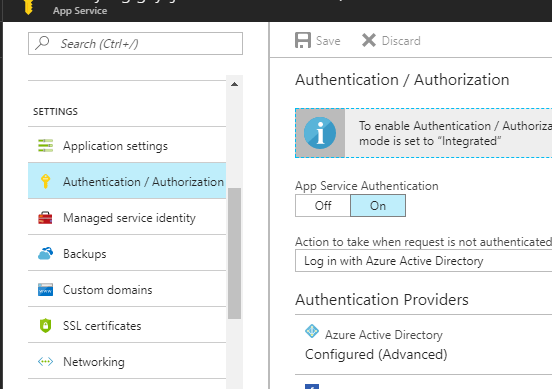
Pick the Authentication / Authorization menu item and turn on App Service Authentication. Then select "Login with Azure Active Directory" from the "Action to take when request is not authenticated" dropdown.

Advanced Configuration

From the listed Authentication Providers, select Azure Active Directory. For the management mode, select Advanced. For the client ID, enter in the Application ID of the newly registered application.

Issuer Url
This was by far the most annoyingly difficult piece to figure out. It will be https://login.microsoftonline.com/{tenant-id} where {tenant-id} is the directory id. To get this url, go back to Office 365 App Registrations, and select the Endpoints top menu item. Copy any of the endpoints and delete everything past your tenant-id, which will be a GUID. (Ex, https://login.microsoftonline.com/xxxxxxxx-eeee-4b8a-a886-xxxd4xxxxxxx/federationmetadata/2007-06/federationmetadata.xml would be https://login.microsoftonline.com/xxxxxxxx-eeee-4b8a-a886-xxxd4xxxxxxx).

All said and done, it should look something like this:


Having all these steps outlined definitely makes it super simple to restrict access to an azure app service to users in an Office 365 subscription using all new portals!

Sunday, September 24, 2017

Create Azure Function Queues Automatically

I have been spending a lot of time working with Azure Functions lately and I really enjoy it, but there are a few pain points still. Automatically creating resources used by the Azure Functions does not seem to be in-the-box. Often, the functions you write need queues or other resources to function properly; meaning the queues may be an implementation detail to the azure functions. If you are a believer in continuous integration and deployment, then you probably have a way to deploy your functions anywhere, but...

Azure Resource Manager

Using Azure Resource Manager (ARM) templates, you can automatically deploy a service plan (consumption or reserved), and deploy your azure functions to that plan. You can also create a storage account and put the connection string to that account into the app setting of the deployed azure functions. However, you cannot create the queues or containers needed by the functions via ARM templates.

PowerShell

One can always take it upon themselves to write a powershell script that grabs the connection string and creates the resources, but now you have to maintain a powershell script with the same names used in your azure functions. This results in two places where magic strings needs to be in sync and while it is technically code, it is an unnecessary break from the programming model we are already using.

Reflection

What I tend to do instead, is some follow some basic conventions and use reflection over my azure functions. Here is what the top of most of my functions look like:

// Storage Helper in another file...
internal static class StorageSettings
{
 public static string ConnectionKey = "myStorageKeyInAppSettings";

 public static CloudStorageAccount StorageAccount { get; } = CloudStorageAccount.Parse(ConfigurationManager.ConnectionStrings[ConnectionKey].ConnectionString);

 public static Lazy<CloudBlobClient> BlobClientLazy = new Lazy<CloudBlobClient>(StorageAccount.CreateCloudBlobClient);
 public static CloudBlobClient BlobClient => BlobClientLazy.Value;

 publicstatic Lazy<CloudQueueClient> QueueClientLazy = new Lazy<CloudQueueClient>(StorageAccount.CreateCloudQueueClient);
 public static CloudQueueClient QueueClient => QueueClientLazy.Value;
}

// Functions class that has Queue resource dependencies
public static class Functions
{
 static Functions()
 {
  System.Diagnostics.Trace.TraceInformation($"Creating queues used by {nameof(Functions)}.");
  Task.WhenAll(QueueNames.Value.Select(x =>
   {
    System.Diagnostics.Trace.TraceInformation($"Creating queue {x} if not exists.");
    return StorageSettings.QueueClient.GetQueueReference(x).CreateIfNotExistsAsync();
   }))
   .GetAwaiter()
   .GetResult();
 }

 private const string StepOneQueueName = "step-one";
 private const string StepTwoQueueName = "step-two";

 private static readonly Lazy<string[]> QueueNames = new Lazy<string[]>(() =>
  typeof(Functions).GetRuntimeFields()
   .Where(x => x.IsLiteral
      && x.FieldType == typeof(string)
      && x.Name.EndsWith("QueueName"))
   .Select(x => (string)x.GetValue(null))
   .ToArray());

 public static async Task StepOneAsync(
  [QueueTrigger(StepOneQueueName, Connection = StorageSettings.ConnectionKey)] string stepOneMessage,
  [Queue(StepTwoQueueName, Connection = StorageSettings.ConnectionKey)] IAsyncCollector<string> stepTwoMessageCollector,
  TraceWriter log)
  {
   /* do work here */
  }
}
As you can see, there is a static helper class that has common information about shared storage accounts (in this case, I just have one, but you could have configuration classes for each storage account). By making the *QueueName and ConnectionKey properties constants, you can use them as attribute values. This removes any chance of fat fingering the queue names or connection keys. In the static constructor of the Functions class, I'm simply looking for any constant whose name ends with QueueName and is a string type. Then I just create all the queues if they do not exist. This keeps the creation of the queues in the same location as the function and is automated.

Monday, September 18, 2017

Xamarin.Android build Task + $(SolutionDir)

I was recently setting up build automation for a Xamarin.Forms project I'm working on and found that the initial template was not able to build my project. I was getting an error like:

C:\Program Files (x86)\Microsoft Visual Studio\2017\Enterprise\MSBuild\15.0\Bin\Microsoft.Common.CurrentVersion.targets(1987,5):
warning MSB3245: Could not resolve this reference. Could not locate the assembly
"Newtonsoft.Json, Version=9.0.0.0, Culture=neutral, PublicKeyToken=30ad4fe6b2a6aeed, processorArchitecture=MSIL".
Check to make sure the assembly exists on disk. If this reference is required by your code, you may get compilation errors.
For SearchPath "{HintPathFromItem}".
Considered "*Undefined*packages\Newtonsoft.Json.9.0.1\lib\portable-net45+wp80+win8+wpa81\Newtonsoft.Json.dll", but it didn't exist.

Notice the *Undefined* in the considered path.

After a little digging, here's what I found.

In all the other projects in the solution, I include packages using the $(SolutionDir) variable in the HintPath like:


<Reference Include="Ninject, Version=3.0.0.0, Culture=neutral, PublicKeyToken=c7192dc5380945e7, processorArchitecture=MSIL">
  <HintPath>$(SolutionDir)packages\Portable.Ninject.3.3.1\lib\portable-net4+sl5+wp8+win8+wpa81+monotouch+monoandroid+Xamarin.iOS\Ninject.dll</HintPat>
  <Private>False</Private>
</Reference>

Because the Xamarin.Android task is building a project, there is no $(SolutionDir) available. If you use the VisualStudio build to build the Xamarin.Forms solution, it will build find. So how to get Xamain.Android to replace the $(SolutionDir) variable?

Add a Build Variable!

To figure out the value of the build variable, at the top of the logs for the Xamarin.Android build step you'll find a few lines like this:

Build started 9/18/2017 8:59:48 PM.
Project "d:\a\3\s\DEV\App.Mobile.Droid\App.Mobile.Droid.csproj" on node 1 (PackageForAndroid target(s)).
In my case, the directory was d:\a\3\s\DEV\ because in the Get Sources step, I specified DEV as the folder to put the sources into. If you don't do this, it will typically be something like c:\a\1\s\
At any rate, after adding a build variable with this value, the Xamarin.Android task is able to properly find the packages required to build the solution.

Wednesday, August 9, 2017

Application Insights filter to Errors

Application insights is an AMAZING tool for monitoring your application. Using the
Microsoft.ApplicationInsights.TraceListener
package with
Microsoft.AspNet.WebApi.Tracing
captures a great deal of information automatically which has reduced my time to identify bugs dramatically.

The Analytics dashboard allows for quick and easy slicing and dicing of data collected. I recently needed to see all Error Traces and found it to be somewhat indirect. I was expecting severityLevel to be 'Error', but it was an integer. Looking at the TraceLevel enum, Error = 1 so maybe that would match. Nope. Error is 3. I imagine this matches something, but it was not obvious so here is how you can get all error traces in the last 24 hours:


// Find error traces in the past 24 hours
traces 
 | where timestamp > ago(24h) and severityLevel == 3

Monday, June 19, 2017

Disable windows defender on Azure VM

I created a development machine in azure using a VS2017 template. I needed to install a bunch of tools, but windows defender was running a slowed everything down. Typically I just press the Windows Key and search for "Defender Settings" to disable windows defender. However, I was not able to find a way in the VM so I found a power shell command to do it for me. Made installation much faster!


Set-MpPreference -DisableRealtimeMonitoring $true

Thursday, May 18, 2017

Build Agent building PCLs

I've recently been getting ready for product launch, including setting up automated deployment into our development environments. Because of a restriction on the unit tests in the project, we cannot use the hosted build agents available with Visual Studio Online. We have to host our own server and install the build agent there.

After following the instructions here Deploy an Agent on Windows, I found that the agent was responding to builds that were queued thru visual studio online. However, since my solution contained PCL projects, I was getting the following error:

Error MSB4019: The imported project "C:\Program Files (x86)\MSBuild\Microsoft\Portable\v4.5\Microsoft.Portable.CSharp.targets" was not found. Confirm that the path in the declaration is correct, and that the file exists on disk.


Googling did not reveal much information, but I eventually stumbled upon this blog post which indicated the need for PortableLibraryTools. Even today, after installing the MS Build Tools 2015, the targets were not available. Installing this with the /buildmachine switch removed the above errors.

Thursday, February 2, 2017

Disposing HttpRequestMessage

I've been working with HttpClient alot lately (oh, how I wish they created an interface for it....) and have noticed quite a few things come up.

Today I wanted to figure out if I actually need to worry about disposing an HttpRequestMessage which I create and use with HttpClient. Because I'm creating the instance directly and I know it's not a derived version (for example, passed into a method as an argument), I can confidently interrogate the circumstances under which it should be disposed.

If I were accepting it as an argument and was expected to control the rest of the objects lifetime, then I would say you *should* to dispose the HttpRequestMessage because you are expected to.

If you create one and use it, specifically with System.Net.Http.HttpClient, you do not actually need to dispose the request object assuming that you successfully call SendAsync and here's why.

I was looking into the corefx/HttpClient repo and in this case, there is a method that is called which disposes the content after reading the response (with a nice comment).


private void HandleFinishSendAsyncCleanup(HttpRequestMessage request, CancellationTokenSource cts, bool disposeCts)
{
    try
    {
        // When a request completes, dispose the request content so the user doesn't have to. This also
        // helps ensure that a HttpContent object is only sent once using HttpClient (similar to HttpRequestMessages
        // that can also be sent only once).
        request.Content?.Dispose();
    }
    finally
    {
        if (disposeCts)
        {
     cts.Dispose();
        }
    }
}


This method is called in a finally block as part of sending the request so it should always get called even if there is an error. I'm not sure there's really anything else to dispose aside from the content so its probably good enough, but I couldn't find any information or source code to persuade me one way or another.

The helper methods for Post, Get, Delete, and Put do not wrap the newly created HttpRequest created in a using statement or make any additional attempt to dispose.

public Task GetAsync(Uri requestUri, HttpCompletionOption completionOption, CancellationToken cancellationToken)
{
    return SendAsync(new HttpRequestMessage(HttpMethod.Get, requestUri), completionOption, cancellationToken);
}

public Task PostAsync(Uri requestUri, HttpContent content, CancellationToken cancellationToken)
{
    HttpRequestMessage request = new HttpRequestMessage(HttpMethod.Post, requestUri);
    request.Content = content;
    return SendAsync(request, cancellationToken);
}

public Task PutAsync(Uri requestUri, HttpContent content, CancellationToken cancellationToken)
{
    HttpRequestMessage request = new HttpRequestMessage(HttpMethod.Put, requestUri);
    request.Content = content;
    return SendAsync(request, cancellationToken);
}

public Task DeleteAsync(Uri requestUri, CancellationToken cancellationToken)
{
    return SendAsync(new HttpRequestMessage(HttpMethod.Delete, requestUri), cancellationToken);
}


I was also looking into the mono version, which does not dispose the request message or its content for you.

So, if you are creating an HttpRequestMessage and passing that message to the SendAsync method of a System.Net.Http.HttpClient, you can rest assured that the request has been disposed for you. If you have reason to believe that an exception may be thrown between creating the message, and calling SendAsync, a using statement would ensure that it is disposed. HOWEVER, even in this case, the only thing that actually gets disposed is the Content property and of the standard content types, only StreamContent actually needs to be disposed. If you are using, say, StringContent, it does not need to be disposed anyway and therefore the message does not need to be disposed.

Again, if we were considering the case of accepting method parameters which we did not create, you can not make these assumptions, but for code which looks like this, you should be pretty safe!

/// <summary> Gets the single, shared HttpClient instance </summary>
protected HttpClient Client {get;}

public async Task<Order> GetOrder(string orderId)
{
    // this message will be dispose when SendAsync is awaited
    HttpRequestMessage getOrderMessage = new HttpRequestMessage(HttpMethod.Get, $"api/orders?orderId={orderId}");

    // there is not really a chance for an error here...
    using(HttpRepsonseMessage response = await this.Client.SendAsync(getOrderMessage))
    {
        response.EnsureSuccessStatusCode();
        return await response.Content.ReadAsAsync<Order>();    
    }
}

Friday, August 12, 2016

It's Official - I Can Develop ASP.NET MVC Web Applications

Recently, I finally decided to go down and take the 70-486 Developing ASP.NET MVC Web Applications exam which is the second of three exams required to become a Microsoft Certified Software Developer (MCSD).

This exam was actually easier (for me, at least) than the 70-483 Programming in C# exam. If you have worked on an MVC project for 2+ years, this should be a piece of cake.

Tips:
  1. Carefully read each question
    For questions which were fill-in-the-blanks, often the answer would be obvious without needing to read the question (can answer purely based on syntax). However, there were cases where an answer to a given question would be revealed in sample code for another question.
  2. First Chance Exceptions
    I think this was the only topic I really did not have much experience with. Make sure you know what First Chance Exceptions are and how they work!
  3. Configuration File Security
    Make sure you understand how to secure parts of your configuration file (like connection strings).

Overall

If you have a few years experience working with MVC, this test will be a no-brainer. I was able to finish the exam in 45 minutes and for many of the questions, the answer was trivially obvious (based on syntax) or something that you really should know. I felt the breadth of topics was waaaay smaller than for the Programming in C# exam so studying was fairly easy. In this case, I am fairly confident that even without studying, I would have passed this exam with no problems.

Being the second of three exams, passing did not increase my standing as far as Certification Titles. With the first exam, I became an MCP. This exam, I remain an MCP. With the next exam (70-487 Developing Microsoft Azure and Web Services) I will achieve the Microsoft Certified Software Developer (MCSD) Title.

Happy Coding!

Friday, July 8, 2016

Knockout + Kendo UI Date Picker - Open To Specific Date without Selecting

Don't you just love working with 3rd party vendor controls? In this post, I want to look at how you can open a Kendo UI Date Picker to a specific date, without selecting the date.

The Problem

Let's say you are using Knockout with Kendo UI and the Knockout-Kendo bindings. Your view model has two properties, one for start date and one for end date.

class DateRange {
    start: KnockoutObservable;
    end: KnockoutObservable;  // end date is optional

    constructor(start?: Date, end?: Date){
        this.start = ko.observable(start);
        this.end = ko.observable(end);
    }
}


When the user selects a start date in the future (more specifically, a start date that requires calendar paging), then we want the end date calendar to open to the same date, but not select the end date because the end date is optional.

The following code does not work correctly. It seems that setting the value of the DateView does not set the value of the observable property bound to the calendar and you cannot re-select the selected date. Consider the following steps:
  1. Select Start Date of July 10th, 2016
  2. Open End Date Calendar; notice that July 10th is selected, but the DateRange.end observable is not set
  3. Attempt to select July 10th for end date; nothing happens

// DOES NOT WORK
<input class="form-control" data-bind="kendoDatePicker: { value: start, min: new Date() }" placeholder="Start Date* (mm/dd/yyyy)" />
<input class="form-control" data-bind="kendoDatePicker: { 
    value: end,
    min: new Date(),
    open: function(e){
        if(start() && !end()) {
            e.sender.dateView.value(start());
        }
    }
}" placeholder="End Date* (mm/dd/yyyy)" />


By setting the value to the desired date and back to null, the date becomes focused, but not selected. This allows re-selection of that date.

// WORKS - null out value again; it keeps focus but is not selected
<input class="form-control" data-bind="kendoDatePicker: { value: start, min: new Date() }" placeholder="Start Date* (mm/dd/yyyy)" />
<input class="form-control" data-bind="kendoDatePicker: {
    value: end,
    min: new Date(),
    open: function(e){
        if(start() && !end()) { 
            e.sender.dateView.value(start());
            e.sender.dateView.value(null);
        }
    }
}" placeholder="End Date* (mm/dd/yyyy)" />

Tuesday, June 14, 2016

Knockout Placeholder Select Binding

So, for whatever reason, the select tag does not support the placeholder attribute. If it did, I'm assuming that's what the Knockout binding for optionsCaption would end up setting. I tried a few approaches to get a placeholder effect from the select box and have a decent working example. Of course, as is true with most coding questions, I started with a quick search of stack overflow. I took the example that worked the best for my scenario and turned it into a knockout binding.
At first, I thought I should extend the existing select binding, however, I soon realized there is no select binding; it just uses value, options, optionsText, ... to accomplish its task. So, I looked into adjusting the optionsCaption binding, and saw that it is just part of the options binding and I followed suit.

ko.bindingHandlers.placeHolderSelect = {
    after: ['options', 'value', 'optionsCaption'],
    init: function (elem, value, allBindings, viewModel, bindingContext) {
        var options = ko.utils.unwrapObservable(value());

        if (allBindings['has']('optionsCaption')) {
            var caption = $(elem).find('option[value=""]');

            if (options === 'required') {
                caption.prop('hidden', 'hidden');
                caption.prop('disabled', 'disabled');
            }

            var emptyClass = 'empty';
            $(elem).change(function() {
                if (!$(elem).val()) {
                    $(elem).addClass(emptyClass);
                } else {
                    $(elem).removeClass(emptyClass);
                }
            });
            $(elem).change();
        }
    }
}

To use this binding, simply add placeHolderSelect and set the value to either 'required' if the selection should not allow the caption to be re-selected or any other value if the caption should allow re-selection.

    <!-- Cannot re-select caption -->
    <select data-bind="options: myOptions, optionsCaption: 'Caption Text', placeHolderSelect: 'required'"></select>

    <!-- Can re-select caption -->
    <select data-bind="options: myOptions, optionsCaption: 'Caption Text', placeHolderSelect: false"></select>
Enjoy!

Monday, June 6, 2016

Decomposing Page Objects

This month has been heavily dedicated to defining a more robust approach to the page object pattern, which I have been calling Page Modeling. Page Modeling is not going away, however, in a recent 'twitter war' with Marcel de Vries, I was forced to really think about what the classic Page Objects pattern brings to the table that Page Modeling is 'missing' and to be able to highlight where Page Modeling fits into the picture.

This post is dedicated to decomposing the page object pattern into three distinct layers of abstraction. I believe that Page Objects have too many responsibilities and this leads to confusion / ambiguity on how to build the Page Object as well as having a need for multiple changes to the Page Object when only simple changes are made to the UI. Of course I will explain further about what this exactly means.

To start, I would like to identify three distinct aspect of the Page Object pattern which I feel should be decoupled.
  1. Page Modeling
    Finding UI elements on screen and exposing the behaviors and observations of those UI elements
  2. Orchestration
    Given the UI capabilities, what are the interesting things we can do
  3. Scenarios
    Given an orchestration, implements scenarios based on real user use of the application
I realized that page modeling alone does not provide all of the utility of page objects, but the additional utility can easily be added. Now, I will cover each aspect and how they can be assembled to implement the page object pattern in a far more robust and maintainable manner. The additional utility, however, doesn't really have a standard abstraction and would be custom to your application. This is because the higher level abstractions depend on the business concerns around how to use the application and are not representing the UI.

Page Modeling

I have covered Page Modeling in depth in previous blogs as well as CodedUI Examples website so I'll just summarize it here. Martin Fowler indicates that
The basic rule of thumb for a page object is that it should allow a software client to do anything and see anything that a human can. It should also provide an interface that's easy to program to and hides the underlying widgetry in the window.
At some point, you actually do need to interrogate that widgetry to test UI state and that the controls are behaving properly (formatting phone numbers, providing money with $, etc). This point is what makes the traditional page object pattern unmanageable as I will try to highlight below. Page Modeling hides the implementation of the widgetry so that the client doesn't care if they are using a TextBox, TextArea, MyCustomTextControl, etc... Page Modeling exposes the observations and behaviors of a UI element. So what are observations and behaviors you ask?

Behaviors

Behaviors are what the user can do with the UI. For instance, setting the value of a TextBox or Clicking a button. The result of a behavior is typically a Page Model representing the next most-likely thing with which the user will interact. This allows for a fluent syntax where the result of an action returns the next thing to work with.

Page Modeling


interface ILoginPage : IPageModel
{
    // instead, expose the components that allow a login to happen
    IReadWriteValuePageModel<string, ILoginPage> Username {get;}
    IReadWriteValuePageModel<string, ILoginPage> Password {get;}
    ISelectionablePageModel<ILoginPage> RememberMe {get;}
    IClickablePageModel<IAccountSettings> Login {get;}
}

interface IAccountSettings : IPageModel
{
    IReadWriteValuePageModel<string, ILoginPage> FirstName {get;}
    IClickablePageModel<IAccountSettings> Save {get;}
}

public void LoginAndSetFirstName()
{
    ILoginPage loginPage = new LoginPage(browserWindow);// get a reference to the login page

    Assert.IsFalse(loginPage.Login.IsActionable()); // IsActionable <=> enabled and visible
    
    Assert.IsTrue(loginPage.UserName.SetText("MyUserName") // set the username which returns reference to the login page
                           .Password.SetText("MyPassword") // set the password which returns reference to the login page
                           .Login.IsActionable());

    IAccountSettings accountSettings = loginPage.Login.Click(); // click login which returns a reference to account settings page

    // from here, I could do more, but the above logic would probably be refactored out into a Scenario
    // IAccountSettings accountSettings = new LoginScenario(loginPage).LoginStandardUser();

    Assert.IsFalse(loginPage.IsRendered());
    Assert.IsTrue(accountSettings.IsRendered());

    string myName = "MyName";
    accountSettings.FirstName.SetText(myName) // set first name returns reference to account settings page
                   .Save().Click() // click save which returns a reference to account settings page
                   .FirstName.Value; // get the current value in the first name field after the page refreshes from the POST request

    Assert.IsTrue(myName.Equals(myName));
}

This fluent syntax is highly expressive of what the user is doing. In Page Objects, you would have a ton of methods like Is{control}{state}(). In Page Modeling, you have one property for each UI element {control} with methods like Is{state}(). Consider the difference below.

Page Objects


class LoginPage : Page
{
    AccountSettings Login(string username, string password);
    bool IsLoginButtonActionable();
}

class AccountSettings : Page
{
    // I can create one method for each property
    // AccountSettings UpdateFirstNameAndSave(string firstName); // oh boy... do not go this route!

    // or use optional parameters for what I want to set
    // which means every time fields are added or removed, this method has to change
    // and the logic inside is kinda crappy if(!String.IsNullOrWhitespace(firstName)) {/*set first name*/} ...
    AccountSettings SetUserInfoAndSave(string firstName = null, string lastName = null, DateTime? birthDate = null);

    // what about reading?  either need a class/struct to hold all the values
    AccountInfo GetUserInfo();

    // or one for each; again, no clear answer
    string GetFirstName();
}

public void LoginAndSetFirstName()
{
    var loginPage = new LoginPage(browserWindow);
    Assert.IsFalse(loginPage.IsLoginButtonActionable());

    // If I login, I can't assert anything about the button, so let me go update my class...
    loginPage.Login("myUser", "myPass");
}

// updating LoginPage
class LoginPage : Page
{
    AccountSettings Login(string username, string password);
    bool IsLoginButtonActionable();
    LoginPage SetUsernameAndPassword(string username, string password);
}

// updating Test
public void LoginAndSetFirstName()
{
    var loginPage = new LoginPage(browserWindow);
    Assert.IsFalse(loginPage.IsLoginButtonActionable());

    loginPage.SetUsernameAndPassword("myUser", "myPass");
    Assert.IsTrue(loginPage.IsLoginButtonActionable());

    // now, I want to login, but I only need click the login button
    // there is no way to do that, I have to either do a .Login call
    // to (again) set the username and password, or update my class!
}

// updating LoginPage
class LoginPage : Page
{
    AccountSettings Login(string username, string password); // no enforcement that this calls SetUsernameAndPassword which may have special logic for setting
    bool IsLoginButtonActionable();
    LoginPage SetUsernameAndPassword(string username, string password);
    AccountSettings ClickLogin(); // assuming only use this method in conjunction with SetUsernameAndPassword method
}

// updating Test
public void LoginAndSetFirstName()
{
    var loginPage = new LoginPage(browserWindow);
    Assert.IsFalse(loginPage.IsLoginButtonActionable());

    loginPage.SetUsernameAndPassword("myUser", "myPass");
    Assert.IsTrue(loginPage.IsLoginButtonActionable());

    var name = "myName";
    IAccountSettings accountSettings = loginPage.ClickLogin();
    accountSettings.SetUserInfoAndSave(firstName: myName);
    Assert.IsTrue(name.Equals(GetFirstName()));
    Assert.IsTrue(name.Equals(GetUserInfo().FirstName));
}

Not only are there a bunch of methods, but there are overlapping concerns and an ambiguous development strategy. There are two ways to login now. Login() and SetUsernameAndPassword() followed by ClickLogin(). Along the way, multiple methods were added just to test something about the UI. In Page Modeling, there is no ambiguity. Simply, there is a property per UI element that exposes what it can do and what about it can be observed.

Observations

Observations are what the user can observe about your UI. For instance, what is the current value of the text box, is the element visible, does it exist on the screen, is it enabled, ... Observations should not have side affects and should not require an action from the user whenever possible. Sometimes this is unavoidable and the observation becomes more similar to a behavior. However, as long as the side affect or user action doesn't require manipulation of state outside of the UI elements control, it is typically safe. An example of this would be that the value of a TextBox is obscured until you click the eyeball in the textbox. An observation that read the text by first clicking the eyeball if needed, and then resetting the state to obscured would be OK. There should be a way to tell if the state of the box is obscured or plain for rigorous testing.

Orchestration

Orchestrations is simply defining meaningful strings of actions against a page model and exposing only the dependencies of that string of actions to the client to call. Using the above case of a login page, an orchestration method may be the Login(string username, string password) method. The orchestration simply takes a reference to whatever page model it orchestrates and uses the exposed observations and behaviors to create a meaningful set of actions.

interface ILoginActions
{
   IAccountSettings Login(string username, string password);
}

public class LoginActions : ILoginActions
{
    public readonly ILoginPage loginPage;
    public LoginActions(ILoginPage loginPage)
    {
       this.loginPage = loginPage;
    }

    public IAccountSettings Login(string username, string password)
    {
       // the orchestrator does not typically need to make assertions,
       // and can assume that there are tests for Login actions
       return
       this.loginPage
           .Username.SetValue(username)
           .Password.SetValue(password)
           .Login.Click();
    }
}

// using the orchestration in a test
public void LoginAndSetFirstName()
{
    var loginPage = new LoginPage(browserWindow);

    // do not care how to actually login
    IAccountSettings accountSettings = new LoginActions(loginPage).Login("myUsername", "myPassword");

    // perform the interesting work of setting name and asserting
    accountSettings.FirstName.SetValue("myName").Save.Click();
    Assert.IsTrue("myName".Equals(accountSettings.FirstName.Value));
}

// could even create extension methods
public static class LoginActionExtensions
{
    public static IAccountSettings Login(this ILoginPage loginPage, string username, string password)
    {
        return new LoginActions(loginPage).Login(username, password);
    }
}

// using the extension in the test seems more natural
public void LoginAndSetFirstName()
{
    // no need to new up some orchestrator class, just get the page and use the extension
    IAccountSettings accountSettings = new LoginPage(browserWindow).Login("username", "password");

    // perform the interesting work of setting name and asserting
    accountSettings.FirstName.SetValue("myName").Save.Click();
    Assert.IsTrue("myName".Equals(accountSettings.FirstName.Value));
}

Using the orchestration classes, tests which are dependent on some previous page model (eg, must first login to get to desired page), can use the orchestration class to not worry about how to perform the given action while knowing that the details are thoroughly tested elsewhere. Commonly used orchestrations would typically become scenarios, which are described next.

Scenarios

Scenarios are even higher level abstractions than orchestrations and they perform a real world user use of the application. Consider you have three types of users: Basic, Premium, and Administrator. Each type would have different login credentials and those credentials could change or even the way login is performed could change, but the Scenario shields tests from these issues. Methods of a Scenario should typically not require any dependencies exposed to the client.

interface ILoginScenarios
{
    IAccountSettings LoginBasicUser();
    IAccountSettings LoginPremiumUser();
    IAdminDashboard LoginAdminUser(); // notice, we're going somewhere else after login; this would be annoying to handle in a test
}

public class LoginScenarios : ILoginScenarios
{
    public readonly ILoginActions loginActions;
    protected readonly BrowserWindow window;

    public LoginScenarios(ILoginPage loginPage, BrowserWindow window) : this(new LoginActions(loginPage), window) { }

    public LoginScenarios(ILoginActions loginActions, BrowserWindow window)
    {
        this.loginActions = loginActions;
        this.window = window;
    }

    public IAccountSettings LoginBasicUser()
    {
       return this.loginActions.Login("basicUsername", "basicPassword");
    }

    public IAccountSettings LoginPremiumUser()
    {
       return this.loginActions.Login("premiumUsername", "premiumPassword");
    }

    public IAdminDashboard LoginAdminUser()
    {
       // don't return as it's not the right model
       this.loginActions.Login("adminUsername", "adminPassword");
       return new AdminDashboard(this.window);
    }
}

// and possibly extensions here as well
public static class LoginScenarioExtensions
{
     public static IAccountSettings LoginBasicUser(this ILoginPage loginPage)
     {
        return new LoginScenarios(loginPage).LoginBasicUser();
     }

     public static IAdminDashboard LoginAdminUser(this ILoginPage loginPage)
     {
        return new LoginScenarios(loginPage).LoginAdminUser();
     }
}


Of course, the downside with extension method approach is that the extension method class cannot implement the interface it reflects, but you could do something more elegant. Let's combine the power of all three layers into a single Facade.

public LoginFacade : ILoginPage, ILoginActions, ILoginScenarios
{
    public readonly ILoginScenarios LoginScenarios;
    public ILoginActions LoginActions => this.LoginScenarios.LoginActions;
    public ILoginPage LoginPage => this.LoginActions.LoginPage;
    protected readonly BrowserWindow window;

    public LoginFacade(ILoginPage loginPage, BrowserWindow window) : this(new LoginActions(loginPage), window) { }
    public LoginFacade(ILoginActions loginActions, BrowserWindow window) : this(new LoginScenarios(loginActions), window) { }
    public LoginFacade(ILoginScenarios loginScenarios, BrowserWindow window)
    {
       this.LoginScenarios = loginScenarios;
       this.window = window;
    }

    // delegate all actions
    IReadWriteValuePageModel<string, ILoginPage> Username => this.LoginPage.Username;
    IReadWriteValuePageModel<string, ILoginPage> Password => this.LoginPage.Password;

    public IAccountSettings Login(string username, string password)
    {
        return this.LoginActions.Login(username, password);
    }

    public IAdminDashboard LoginAdminUser()
    {
        return this.LoginScenarios.LoginAdminUser();
    }
}


And we have come full circle. There is now a master object that can do all three layers which the client can manipulate. Each layer is exposed so that tests can test the granular widgetry if needed or simply use an orchestration or scenario to navigate past the already tested workflows of the application.

Hopefully I've convinced you that decoupling the Page Object pattern is worth the effort and reduces ambiguity while increasing consistency of the testing strategy.

Sunday, June 5, 2016

Change Image Source on Hover using Knockout JS

I found this js fiddle for how to do it using jQuery so I converted it to use a Knockout binding.  Surprisingly, the first page of google didn't have any KO binding to do it.

ko.bindingHandlers.hoverImage = {
  init: function(element, valueAccessor) {
    var options = ko.utils.unwrapObservable(valueAccessor());
    $(element).bind('mouseover', function(event) {
      var $this = $(this);
      if (!$this.data('original-image')) {
          $this.data('original-image', $this.attr('src'));
      }
      $this.attr('src', options);
    })
    .bind('mouseout', function(event) {
       var $this = $(this);
       $this.attr('src', $this.data('original-image'));
    });
  }
};
To use it,
<img src="initialImageSrc.jpg" data-bind="hoverImage: 'hoverImageSrc.jpg'>

Saturday, June 4, 2016

Proper Page Modeling - In depth

In a previous article, I tried to explain why the page object pattern that I have seen described is simply lacking from what it could be.

Let's start with the good things about page objects.

1.  They are an abstraction of what the page should do
2.  They provide an implementation agnostic approach to testing (don't care if wpf, html, etc)
3.  They allow for more easily readable, and therefore more maintainable, code
4.  They provide a easy to understand navigation pattern where the result of actions are the next thing to work with

Ok, great.  How is this accomplished.  Let's look at an example in depth and compare what I've seen as 'traditional' page objects and compare to my approach to page modeling.

Let's take two pages into account.  Login page and Account Settings page.


When you login successfully, you'll go to the account settings page.

In code, your traditional page objects may look something like this.

class LoginPage : Page
{
    /// Logs in using the credentials supplied
    AccountSettings Login(string username, string password, bool rememberMe);
    RegisterPage ClickRegisterLink();
    ForgotPasswordPage ClickForgotPassword();
    AccountSettings LoginWithTwitter(string twittername, string twitterpass);
    AccountSettings LoginWithFacebook(string facebookname, string facebookpass);
}

I think this much we can agree upon.  Now, where it starts to fall apart for me.  Here is a quote from uncle bob martin.

There are differences of opinion on whether page objects should include assertions themselves, or just provide data for test scripts to do the assertions. Advocates of including assertions in page objects say that this helps avoid duplication of assertions in test scripts, makes it easier to provide better error messages, and supports a more TellDontAsk style API. Advocates of assertion-free page objects say that including assertions mixes the responsibilities of providing access to page data with assertion logic, and leads to a bloated page object.
I favor having no assertions in page objects. I think you can avoid duplication by providing assertion libraries for common assertions - which can also make it easier to provide good diagnostics. 

I agree with no assertions in page objects.  He makes an aside that I also agree with:
One form of assertions is fine even for people like me who generally favor a no-assertion style. These assertions are those that check the invariants of a page or the application at this point, rather than specific things that a test is probing. 
So, I know that there are more things about this page like, is the login button enabled when no username or password is present.  Here are two ways I can extend this class:

class LoginPage : Page
{
    bool IsValid();
}

In this case, how do I know what is not valid so I can fix it?  Also, what does the logic look like for this method?

public bool IsValid()
{
    if(String.IsNullOrEmpty(username.Text) || String.IsNullOrEmpty(password.Text))
    {
        if(loginButton.Enabled)
        {return false;}
    }
    else
    {
        if(!loginButton.Enabled){ return false; }
    }

    // .. maybe more tests for other requirements?
    // what about this?
    // these are requirements for the page that these elements are visible
    if(!IsRegisterLinkVisible()) { return false; }
    if (!IsForgotPasswordLinkVisible()) { return false; }

    // and that they work?
    var registerHref = GetRegisterHref();
     using(var client = new HttpClient())
     {
         var result = await client.GetAsync(registerHref);
          if(!result.IsSuccessful) { return false; }
     }
    return true;
}

Or, I could just throw an exception so I can include detail about what is wrong:

class LoginPage : Page
{
    void ThrowIfNotValid();
}

but this is not good either.  I can't just ask the page if it's valid with out a try block.

So, I can expose all of the things I'm expecting?

class LoginPage : Page
{
    bool IsLoginButtonProperlyEnabledOrDisabled();
}

and then maybe a master IsValid that calls these and possibly throws an exception.

Now, say that the button is not supposed to be disabled, but it is supposed to be 'inactive', but still clickable to trigger form validation.

Ok, so I have to either update this method to

class LoginPage : Page
{
    bool IsLoginButtonPropertlyInactiveOrActive();
}

which is crazy.  Or, I can not rename the method and change the logic so that it doesn't really match.

Another approach to this would be just add methods for each thing you want to test.  Great,

class LoginPage : Page
{
    bool IsLoginButtonEnabled();
    LoginPage SetUsernameAndPassword(string user, string pass); // don't login, just set
}

but when requirement changes to inactive,

class LoginPage : Page
{
    bool IsLoginButtonActive();
}

So, requirements change again.  The password is only visible when a username with 6 or more characters is present.  Great, more methods.

class LoginPage : Page
{
    bool IsPasswordVisible();
    LoginPage SetUsername(string user);
}

To me, this is clearly a violation of open / close principal.  Especially since this is highly predictable.  UI elements have a natural set of consistent things you may want to do with them.  Testing UI elements for visibility, click-ability, enabled-ness, ... are extremely natural concerns and should be consistently available for all UI elements.

We'll look at crafting tests after the comparison with my approach to page modeling.

In my approach to page modeling, I strive for consistency of expression of the UI elements that create the control.  In my approach, the model looks like this:

// because of this inheritance, the login page is also testable for isvisible, exists, ...
interface ILoginPage : IPageModel
{
    // this type of method doesn't even belong here.  it belongs at some other level of abstraction
    // what a 'Login' action means is not any concern of this control
    //AccountSettings Login(string username, string password, bool rememberMe);

    // instead, expose the components that allow a login to happen
    IReadWriteValuePageModel<string, ILoginPage> Username {get;}
    IReadWriteValuePageModel<string, ILoginPage> Password {get;}
    ISelectionablePageModel<ILoginPage> RememberMe {get;}
    IClickablePageModel<IAccountSettings> Login {get;}

    // expose an object that supports click, and all native ui tests (is visible, enabled, ...)
    IClickablePageModel<IRegisterPage> Register {get;}
    IClickablePageModel<IForgotPasswordPage> ForgotPassword {get;}
    IClickablePageModel<ITwitterLoginPage> Twitter {get;set;}
    IClickablePageModel<IFacebookLoginPage> Facebook {get;set;}
}

Another interesting this happens here.  What happens if the facebook login button is on multiple pages.  The LoginWithFacebook(string facebookname, string facebookpass) logic has to be duplicated to all the pages that use it or some helper class is created to share logic.  Again, this belongs at a different level of abstraction for the testing.

To enable these scenarios, you could do something like:

class LoginPageUserActions
{
    protected ILoginPage LoginPage{get;}

    public LoginPageUserActions(ILoginPage loginPage)
    {
         this.LoginPage = loginPage;
    }

    public AccountSettings Login(string username, string password, bool rememberMe)
    {
         // even here, just assume that login works, no need for assertions
         // there should be tests to verify that login works
        return  this.LoginPage
                         .Username.SetText(username)
                        .Password.SetText(password)
                        .RememberMe.SetSelected(rememberMe)
                        .Login.Click();
    }
}

Now, lets compare how you write the tests for the above business requirements and implement the changes in both approaches.

Business Requirements:

1.  Main Login Control
-> Username, Password, and Remember Me all present and enabled
-> Login button visible, but disabled until username and password are set

2.  External Login Control
-> Facebook and Twitter links are present and enabled always

3.  Register Link
-> Present and enabled always

4.  Forgot password
-> Present and enabled always

5.  Upon successful login, the user lands on account settings page.

So the start of the test class would look like this:

public class LoginPageTests()
{
         protected BrowserWindow window;

         [TestInitialize]
         public void GivenLoginPage()
         {
              this.window = BrowserWindow.Launch("loginpageurl");
         }
}

I like to follow the Given, When, Then type of syntax where the Given is my test initialize as the arrange, the When and Then are part of the TestMethod as the act and assert.

To add the first business requirement for the main login control, we run into the first issue that I mentioned.  I could have an IsValid method that captures all this logic, or maybe an IsMainLoginControlValid method that only tests that part of the control.  Seems wrong for the model to do the testing; I would have thought the test class decides what IsValid means*. (* full disclosure, I violate this run on very rare occasion)

So maybe the test looks like:

public void ThenUsernamePasswordAndRememberMeVisibleAndEnabled()
{
    Assert.IsTrue(new LoginPage(this.window).IsValid());
}

Granted, it's short and sweet, it doesn't really tell me much.  And the next test would look the same:

public void ThenTheLoginButtonIsNotEnabled()
{
    Assert.IsTrue(new LoginPage(this.window).IsValid());
}

And finally some actual work:

public void WhenUsernameAndPasswordEntered_ThenLoginButtonIsEnabled()
{
    var loginPage = new LoginPage(this.window);
    Assert.IsTrue(loginPage.IsValid());
    loginPage.SetUsernameAndPassword("user", "pass");
    Assert.IsTrue(loginPage.IsValid()); 
}

Aside from the method name, I really have no idea what this would be testing for :)

Ok, so ditch the is valid approach and expose the methods of interest:

public void ThenUsernamePasswordAndRememberMeVisibleAndEnabled()
{
    var loginPage = new LoginPage(this.window);

    // add all these methods to the class first ~_~
    Assert.IsTrue(loginPage.IsUsernameVisible() && 
    loginPage.IsUsernameEnabled() &&
    loginPage.IsPasswordVisible() &&
    loginPage.IsPasswordEnabled());

    // maybe more simply, add these instead and hope you don't need to test them separately
    Assert.IsTrue(loginPage.IsUsernameVisibleAndEnabled() && loginPage.IsPasswordVisibleAndEnabled()); // still not great :/
}

public void ThenTheLoginButtonIsNotEnabled()
{
    Assert.IsFalse(loginPage.IsLoginButtonEnabled());
}

public void WhenUsernameAndPasswordEntered_ThenLoginButtonIsEnabled()
{
    loginPage.SetUsernameAndPassword("user", "pass");
   Assert.IsTrue(loginPage.IsLoginButtonEnabled());
}

To implement the next requirements, I would do the same thing = add tons of methods for testing the UI state, which are business requirements.  I'll skip 2, 3, and 4 for this reason.  You can imagine what that looks like.

The last requirement would involve the next page's model.  Presently, there is no way to test if the page is actually the page displayed to the user.  So maybe that should be in the isvalid method.  Or maybe it should be an IsPageVisible() method on the page object.

public void WhenValidCredentials_ThenAccountSettingsIsShown()
{
    var loginPage = new LoginPage(this.window);
    var accountPage = loginPage.Login("user", "pass");
    
    Assert.IsTrue(accountPage.IsPageVisible());
    Assert.IsFalse(loginPage.IsPageShown()); // there is no enforcement on consistency and someone named it differently...
}

Ok, so now the requirement changes.  

1.  Login button is not supposed to be disabled, it is supposed to be inactive and validation error is shown, if any, when clicked.
2.  Password is only visible if username with 6 or more characters is present.

In the case of IsValid, we'd go into the method and change the logic to reflect this, shuffle some test names around and add one test method:

// method name change
public void ThenUsernameAndRememberMeVisibleAndEnabledPasswordHidden()
{
    // body doesn't change as it doesn't really express much 
    Assert.IsTrue(new LoginPage(this.window).IsValid());
}

// method name change
public void ThenTheLoginButtonIsInactive()
{
    Assert.IsTrue(new LoginPage(this.window).IsValid());
}

public void WhenUsernameWithSixOrMoreCharacters_ThenPasswordIsShown()
{
     var loginPage = new LoginPage(this.window);
    Assert.IsTrue(loginPage.IsValid());
    loginPage.SetUsername("username");
    
     // still not an overly expressive test :/
    Assert.IsTrue(loginPage.IsValid()); 
}

In the case of exposing tons of methods for everything, you would change the IsEnabled methods to IsActive for the login button.  Not much different from the previous.

Using page models, lets do the same exercise.  Firstly, because of this approach, there is no ambiguity as to what methods to add to your UI.  Simply, you expose whatever UI elements are present and that is enough for the test to drive (or some middle, orchestration abstraction).

public void ThenUsernamePasswordAndRememberMeVisibleAndEnabled()
{
    var loginPage = new LoginPage(this.window);
     // more expressive about what is valid means for a given set of inputs (in this case, no inputs)
    Assert.IsTrue(loginPage.Username.IsActionable() && loginPage.Password.IsActionable() && loginPage.RememberMe.IsActionable());
}

public void ThenLoginButtonIsDisabled()
{
    Assert.IsTrue(new LoginPage(this.window).Login.IsNotEnabled())
}

public void WhenUsernameAndPasswordEntered_ThenLoginButtonIsEnabled()
{
    Assert.IsTrue(loginPage.Username.SetText("user")
                                        .Password.SetText("pass")
                                        .Login.IsEnabled())
}

public void WhenValidCredentials_ThenAccountSettingsIsShown()
{
    var loginPage = new LoginPage(this.window);
    // this method chain to login can be shared easily (see below)
    var accountPage = loginPage.UserName.SetText("user").Password.SetText("pass").Login.Click();
    
    Assert.IsTrue(accountPage.IsVisible());
    Assert.IsFalse(loginPage.IsVisible()); // enforcement on consistency
}

Notice, when writing these tests, I did not need to add anything to my model.  Also, there is room for a shared set of actions that are higher level that setting values and clicking things.  

public void WhenValidCredentials_ThenAccountSettingsIsShown()
{
    var loginPage = new LoginPage(this.window);
    var loginActions = new LoginPageActions(loginPage);
    var accountPage = loginActions.Login("username", "pass");
    
    Assert.IsTrue(accountPage.IsVisible());
    Assert.IsFalse(loginPage.IsVisible()); // enforcement on consistency
}

The underlying point I'm trying to make here is that you may want to very rigorously test the login page details in the login page tests, and then assume that login works in the shared code which does not need to be rigorous in assertions about page state.  This is probably my biggest gripe with page object pattern that I've seen explained.  It is not the page object's concern to know all these things.  It only stores values that may or may not be read and exposes hooks to click on things or other user actions.

So, to make the same requirement changes, nothing changes in the model.  Only the test for that requirement changes.

public void ThenUsernameAndRememberMeVisibleAndEnabledPasswordHidden()
{
     var loginPage = new LoginPage(this.window);
     // more expressive about what is valid means for a given set of inputs (in this case, no inputs)
    Assert.IsTrue(loginPage.Username.IsActionable() && loginPage.Password.IsNotRendered() && loginPage.RememberMe.IsActionable());
}

// method name change
public void ThenTheLoginButtonIsInactive()
{
    Assert.IsTrue(new LoginPage(this.window).Login.IsNotActive());
}

public void WhenUsernameWithSixOrMoreCharacters_ThenPasswordIsShown()
{
     var loginPage = new LoginPage(this.window);
     loginPage.Username.SetText("abc");
     Assert.IsTrue(loginPage.Password.IsNotRendered());
     loingPage.Username.SetText("userna");
     Assert.IsTrue(loginPage.Password.IsRendered());
}

Another point that falls out of this example is that in the traditional page objects approach, I had a Login(string username, string password, bool rememberMe) method for setting all three inputs and clicking login.  I had to add another method to only set username and password so I can test the login button visibility.  Then I had to add one to set only user name to test password visibility when requirement changed.

In this case, nothing had to be changed.  You can expect to want to test input boxes for visibility and to set and read text from them.

Now, we add in the requirement for the validation messages to be shown when login is clicked, but username or password not set.

In the traditional approach, we have to add a method for clicking the button (since we're not doing a login, but trying anyway; maybe the Login method allows empty string as input, or maybe it throws; so implementation details are bleeding out if I assume something about it).  Or a method to explicitly clear username or password and click ClickLoginWithoutUsernamePassword();

class LoginPage : Page
{
    // notice this return type is ambiguous.  If i click after SetUsernameAndPassword,
   // I would actually go to AccountSettingsPage, but I'm adding to satisfy test requirement
   // of click to fail
    LoginPage ClickLoginButton();
    AccountSettings ClickLoginButton2();

    LoginPage ClickLoginWithoutUsernamePassword(); // not ambiguous

    bool IsValidationMessageShown(); // maybe IsCorrectValidationMessageShown()?
     string GetValidationMessageText();
    // or worse
    bool IsExpectedValidationMessage(string message);
}

Notice, I have to add two methods for validation message:  Is it shown (not consistent naming) and what is the value of the text shown.  If I want to know more about the message, more methods!

Using page modeling, you get the login button click for free and just need to add a property for the validation message.

public ILoginPage : IPageModel
{
    IValuedPageModel<string, ILoginPage> ValidationMessage {get;}
}

and the tests for both:

// Using is valid is still not interesting
public void WhenNoUsernameAndLoginClicked_ThenValidationMessageShown()
{
    Assert.IsTrue(loginPage.IsValid());
    loginPage.Setusername("User");
    var page = loginPage.ClickLoginButton();

    Assert.IsTrue(loginPage.IsValid());
}

public void WhenNoUsernameAndLoginClicked_ThenValidationMessageShown()
{
      Assert.IsFalse(loginPage.IsValdationMessageShown());
      loginPage.SetUsername("username").ClickLoginButton();
      Assert.IsTrue(loginPage.IsValidationMessageShown());
       Assert.IsTrue(loginPage.GetValidationMessage().Equals(expectedMessage));
}

Again, very inconsistent methods and requirement to constantly add stuff to the page model.  With page modeling:

public void WhenNoUsernameAndLoginClicked_ThenValidationMessageShown()
{
      Assert.IsFalse(loginPage.ValidationMessage.IsRendered());
      loginPage.SetUsername("username").Login.Click();
      Assert.IsTrue(loginPage.ValidationMessage.IsRendered());
       Assert.IsTrue(loginPage.ValidationMessage.Text.Equals(expectedMessage));
}

Edit: Added examples for changing login method to require a pin

So, I was challenged that this approach is not maintainable considering the example of login changing to require a pin instead of a password.

I will show how page modeling is less affected by this change than page objects in this case.

Regardless, this is a large change.  In the case of page objects, I would update my login page as:

class LoginPage : Page
{
    // AccountSettings Login(string username, string password, bool rememberMe);
    AccountSettings Login(string username, int pin, bool rememberMe);

// all the IsPinVisible, IsPinEnabled methods have to replace the password ones
// and any orchestration method that uses password
    // bool IsPasswordVisible();
   bool IsPinVisible();

    // bool IsPasswordEnabled();
    bool IsPinEnabled();

   // there is nothing like this in page modeling to update since it belongs in a test
   // SetUsernameAndPin(string username, int pin);
}

This change requires EVERY test that logs in to change.  There is no avoiding this as the password type changed from string to int so at a minimum you'll have to make that change.

This is also true for the page modeling abstraction, but in a different way.  The orchestration layer is affected, and the tests for the login page it self are affected.

class LoginPageUserActions
{
    protected ILoginPage LoginPage{get;}

    public LoginPageUserActions(ILoginPage loginPage)
    {
         this.LoginPage = loginPage;
    }

    public AccountSettings Login(string username, int pin, bool rememberMe)
    {
         // even here, just assume that login works, no need for assertions
         // there should be tests to verify that login works
        return  this.LoginPage
                         .Username.SetText(username)
                        .Pin.SetValue(pin)
                        .RememberMe.SetSelected(rememberMe)
                        .Login.Click();
    }

    // there is no need for an orchestration method like SetUsernameAndPassword
    // it doesn't help anything and is added to page object purely to provide functionality for testing
}

This is exactly the same change that was required by page object.  However, the model for the page changes only by updating it's properties (do not need to change methods around at all since they have the same abstraction over the input).  This reflects much more accurately the real change.  The page added a pin and removed a password.

interface ILoginPage : IPageModel
{
     // password changes to pin
    // IValuable<string, ILoginPage> Password {get;}
    IReadWriteValuePageModel<int, ILoginPage> Pin{get;}
}

The only places that use the Pin directly are the tests for the login page itself.  Everything else uses the LoginPageUserActions orchestration wrapper.

To show what this would look like, lets continue on to the AccountSettings tests.

public class AccountSettingsTests
{
    BrowserWindow window;
    IAccountSettings accountSettings;

    [TestInitialize]
    public void GivenAccountSettingsPage()
    {
          this.window = BrowserWindow.Launch("loginpageurl");

          // before change to use pin
          //new LoginPageUserActions(new LoginPage(this.window)).Login("user", "password");

          // after the change to use pin
          this.accountSettings = new LoginPageUserActions(new LoginPage(this.window)).Login("user", 1234);
    }

    public void WhenChangeFirstNameAndSave_ThenFirstNameIsUpdated()
     {
            this.accountSettings.FirstName.SetText("New Value").Save.Click();
            this.window.Refresh();
            Assert.IsTrue(this.accountSettings.FirstName.Value.Equals("New Value"));
     }
}

Even if I have 1,000 tests in account settings, the only change was in Initialize().  Further, that change is required for page objects as well.

Now, the changes required to page objects are actually more because of the change required for all the methods.  Page Models had exactly one change and that was to remove old property and add new one.  Page objects has to replace all old methods with new ones.

In the page modeling approach, you have extensive tests for a given page and other pages use an orchestration class.  To me, this is far more maintainable than updating tons of methods.  Also, the Pin property is exactly the same as the Password property except that its .SetValue() method takes an int instead of a string.  Testing for visibility, enabled, etc... are all exactly the same and would not change in tests (aside from property name).  You could probably just do a refactor -> rename, change the type, and update the methods that use it to put an int when setting the text.  All other usage would be identical.


Friday, June 3, 2016

Proper Page Modeling (aka Page Objects)

It is making me crazy to see how many people are talking about Page Objects in what seems to be the least robust way possible.  I will try to keep it civil, but here are several examples of what I consider a terrible way to model your UI for testing:

http://www.seleniumhq.org/docs/06_test_design_considerations.jsp#page-object-design-pattern
http://fluentbytes.com/maintainable-test-automation-for-winforms-using-codedui/ (this one makes me particularly sad as it's Marcel and he's kinda the name for testing in this space ~_~)
https://www.youtube.com/watch?list=PL6tu16kXT9PoUbSYNcLrMG8ox6UBbbsCv&v=UUxSUsUVg-U

In all of these cases, the page objects have methods like .SetUserName("MyUserName"), .ClickLoginLink(), .LoginUser(string username, string password).

How terribly inconsistent and un-maintainable.  What if the user name input is not shown by default and there is a button that shows the user name box.  I'll have to add methods for .IsUserNameBoxVisible(), .ClickButtonToShowUserNameBox().  Wowzer.  As a tester who did not write the page object, I have no consistent expectation of what the page object can do or what the controls on the page can do or what I can assert about them.

Instead, the page object, which I'll now refer to as a Page Model, should expose the UserName input as a property which has methods for .IsVisible(), .Click(), .IsEnabled(), .SetText(string text).  Now, instead of .SetUserName("MyUserName"), it would be .UserName.SetText("MyUserName").  At a glance you may say, so what?  However, having the .UserName property gives me (for free) all of the common actions I may take.  For instance,

interface ILoginPage : IPageModel
{
    IReadWriteValuePageModel<string, ILoginPage> UserName {get;}
    IValuablePageModel<string, ILoginPage> Password {get;}
    IClickablePageModel<ILoginPage> ShowLogin {get;}
    IClickablePageModel<IAccountPage> Login{get;}
}

// page starts with username hidden
Assert.IsTrue(UserName.IsHidden());

// click show login button
ShowLogin.Click();

// assert that the user name is now visible
Assert.IsTrue(UserName.IsVisible());

// assert that the login button is disabled (no username / password entered)
Assert.IsTrue(Login.IsNotActionable());

// enter user name
UserName.SetText("MyUserName");

// assert login button is still disabled (no password)
Assert.IsTrue(Login.IsNotActionable());

// enter a password
Password.SetText("MyPassword");

// the login button should be enabled
Assert.IsTrue(Login.IsActionable());

Login.Click();

compared to

interface ILoginPage
{
    ILoginPage SetUserName(string userName);
    bool IsUserNameVisible();
    ILoginPage SetPassword(string password);
    ILoginPage ClickShowUsernameButton();
    bool IsLoginButtonEnabled();
    IAccountPage ClickLoginButton();
}

If I want to check if the password is visible, then I have to add it as a method.  If I want to check that the show username button disappears after clicking, I have to add a method.  This violates the Open / Close principal and in general is annoying.

It is the responsibility of the tests themselves to create these higher level concepts like

public void LoginUser(string username, string password)
{
    if(ShowLogin.IsVisible())
    {
         ShowLogin.Click();
    }

    UserName.SetText(username).Password.SetText(password).Login.Click();
}

Then, this can be reused in a test:

[TestMethod]
public void GivenLogin_WhenSaveFirstNameInProfile_ThenNameIsLoadedBack()
{
    var accountPage = LoginUser("someUser", "somePass");
    Assert.IsTrue(accountPage.IsVisible());

    string myName = "Myname";
    account.FirstName.SetText(myName).Save.Click();
    Logoff();

    accountPage = LoginUser("someUser", "somePass");
    Assert.IsTrue(myName.Equals(accountPage.FirstName.Value));
}